After purchase
Enter your Quick To-Do registration code.
Your registration email contains the code you need. Follow these six steps to activate Quick To-Do Pro.
Keep the registration email open while following this guide. Copy the entire code exactly as supplied—typing it manually can introduce errors.
- Step 1
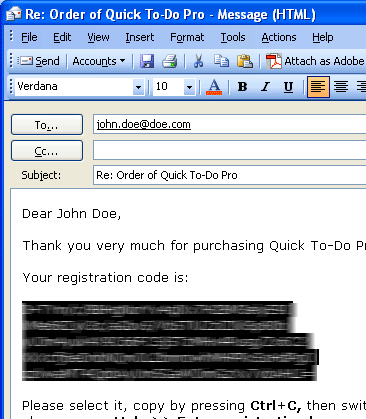
Copy the code from your email
Open the registration email sent by Capstralia after your payment is processed. Select the complete registration code and press Ctrl+C to copy it.
- Step 2
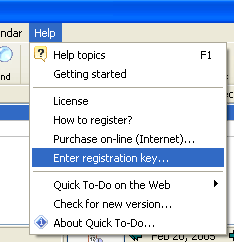
Open the registration window
In Quick To-Do Pro, choose Help, then Enter registration key…
- Step 3
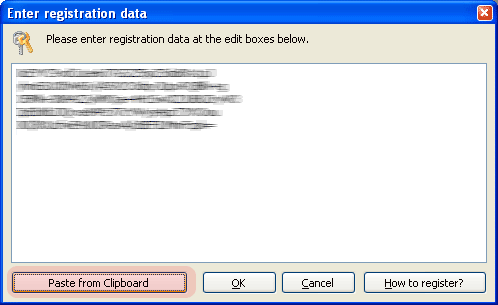
Paste from the clipboard
Select Paste from Clipboard to place the complete registration key into the registration window.
- Step 4
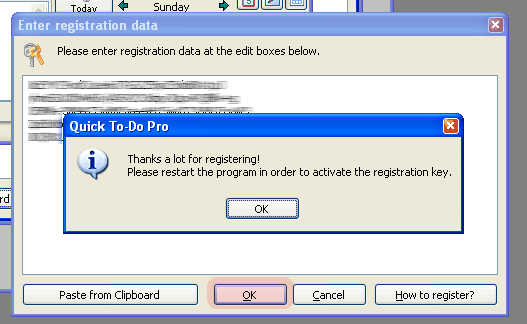
Confirm the registration
Select OK. Quick To-Do should display a thank-you confirmation message.
- Step 5
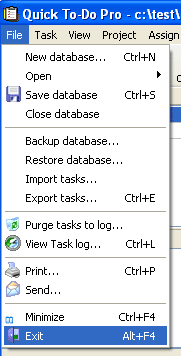
Exit Quick To-Do completely
Choose File, then Exit. Closing the program completely allows it to activate the new registration information.
- Step 6
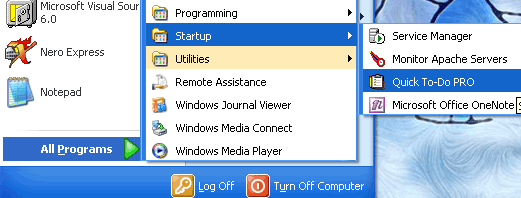
Reopen Quick To-Do Pro
Start the program again. The evaluation dialog should no longer appear, confirming that your registration was accepted.
Registration complete
If the evaluation window still appears after restarting, copy the code again and repeat the process. Contact support if it is still not accepted.